




ChatGPT product feed for ChatGPT Ads

  • Built from your existing Google Shopping feed
  • Checked, cleaned and in OpenAI format
  • Transferred to OpenAI automatically every day
Get advice now
4.9
Based on 33 reviews
SISTRIX certified agency
Microsoft Partner Badge
Logo with red and orange triangles, text: Awin Certified Agency 2025.

No duplicate feed maintenance

The basis is the feed you already have, for example for Google Shopping. The Feed Manager automatically includes changes to prices, availability or range in the feed for OpenAI with the next run.


Checked before every transfer

Every product is checked against the OpenAI required fields and format rules built into the Feed Manager. Faulty entries are filtered out with a reason instead of putting the entire feed at risk.

Protection against faulty runs

If your shop suddenly delivers far fewer products, the Feed Manager stops the transfer and the last working feed stays online.

Import from your feed

Google Shopping feeds in XML format as well as CSV and TSV files, retrieved via a URL, password-protected if required. The tool detects the format and delimiter itself.

Conversion to OpenAI format

Fields such as title, description, price, availability, brand, images and GTIN are transferred into the schema required by OpenAI. German values such as “lieferbar” are converted correctly.

Clean-up

HTML is removed from descriptions, GTINs are checked using the check digit, dimensions and units are standardised and sale prices that are not lower than the regular price are discarded.

Control per product

For each product, we define whether it may be advertised and whether ChatGPT may show it in answers. The Feed Manager also sets the flag for direct purchase in the chat; OpenAI does not currently offer this function in Germany.

Automatic transfer

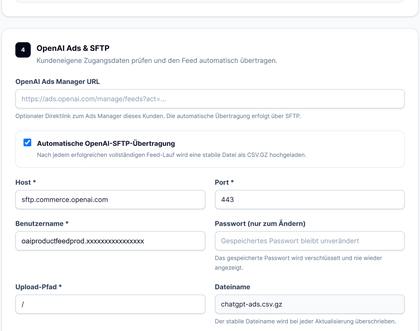
The finished feed is compressed and transferred via SFTP to your OpenAI Ads Manager account every day, or several times a day if required.

Log and alerts

Every run is logged, with the number of products accepted and filtered out and the reasons. We are notified by email if errors occur.

1

Checking the feed

We look at your existing feed and check which required fields are present and where data is missing.

2

Test run

A test run with up to 100 products shows which products are accepted and which would be filtered out, and why.

3

Adding missing data

We add missing details such as brand or availability together with you, ideally directly in the shop so that all channels benefit.

4

Setting up the SFTP connection

We store the SFTP access details from your OpenAI Ads Manager and test the connection.

5

Enabling products

We define which products may be advertised and shown in ChatGPT answers and set the protection threshold for faulty runs.

6

Ongoing operation

The feed updates automatically. We keep an eye on runs, alerts and campaign performance.


 Ready for product ads in ChatGPT? 

We bring your feed into the OpenAI Ads Manager.

Send us the URL of your shopping feed and we will show you in a test run how many products can be used straight away.


Have your feed checked
 Google Shopping and ChatGPT 

Why a Google Shopping feed alone is not enough

OpenAI’s product feed is based on familiar shopping feeds but differs in important respects. A few examples:

  • Formats: OpenAI processes CSV, TSV, JSONL and Parquet, each compressed. XML, the standard format of many Google Shopping feeds, is not supported.
  • Required fields: in addition to title, description, URL, image, price, availability and brand, OpenAI requires the seller name and whether a product may be advertised, among other things.
  • Values: availability, prices and currencies must follow precisely defined formats. Deviating values can lead to products being rejected.
  • Permissions: three switches per product control whether it may be advertised, shown in answers or (where OpenAI offers this in the market) bought directly in the chat.
  • Updates: for product feeds in ChatGPT, OpenAI recommends submitting the full catalogue at least once a day and sending price or availability changes for individual products via the API during the day. Access is currently open to approved partners and geared towards the US. For product feeds for ads, OpenAI also names a Delta API that only transfers the fields that have changed, such as title, price or availability.

Find out more about formats, fields and the set-up in the Ads Manager in our ChatGPT Ads webinar recap.

 ChatGPT product feed with Rheinwunder 

Let's get your feed ready for ChatGPT

We check your existing feed and show you what is missing for product ads in ChatGPT.

Microsoft Partner Badge
SISTRIX certified agency
4.9
Based on 33 reviews
A man in a white shirt leans against a wall next to the Rheinwunder logo
Founder and Managing Director Ralph Grundmann 0228 243 313 53


Information on how we process your data can be found in our Privacy Policy.