



AI Alt-Text Generator en

  • Automatic alt texts for SEO & accessibility
  • WordPress plugin, single entry & CSV batch processing
  • Better accessibility for screen readers & users
Test now!
4.9
Based on 33 reviews
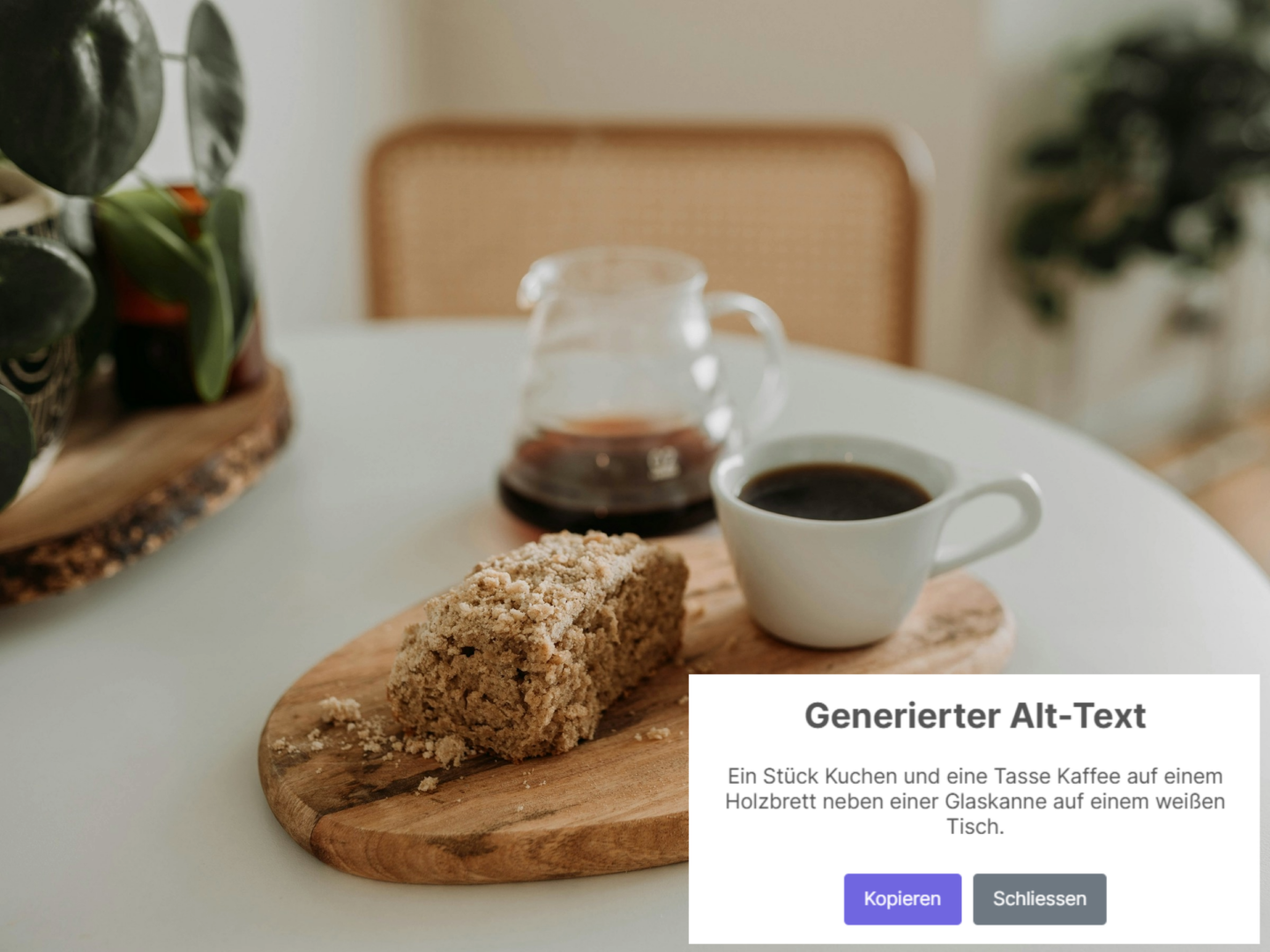
Screenshot zeigt die Funktionsweise das KI basierten Alt-Text-Generators
 This is how our AI alt text generator works in practice 

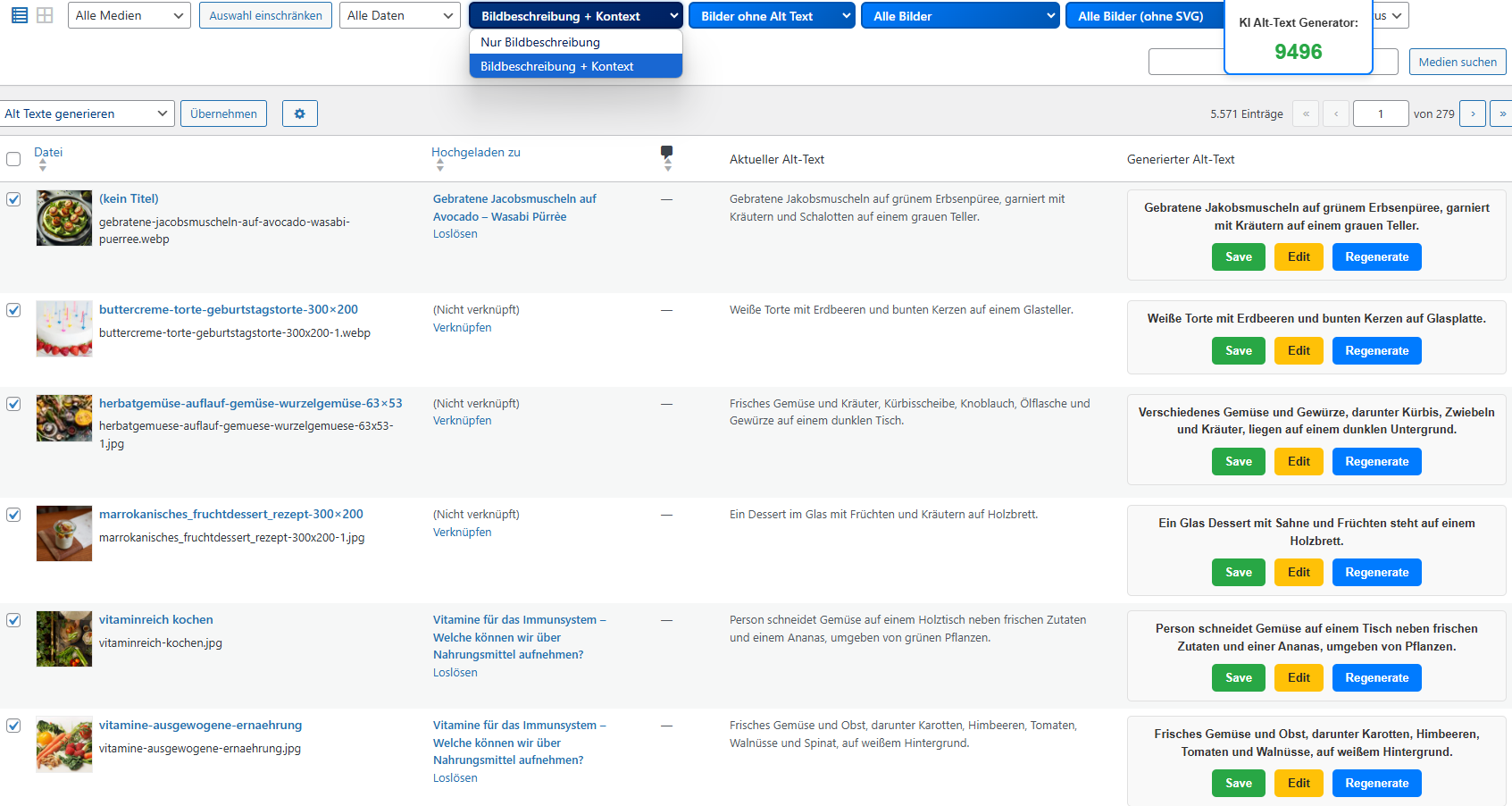
Automatically generated alt text with optional context analysis

Our tool analyzes not only the image but also, depending on the settings, the surrounding text to generate particularly precise and context-related alt texts. Users can choose whether only the image should be described or whether the surrounding text should be used for better content contextualization.

Thanks to state-of-the-art AI technology, the tool recognizes colors, objects, and relevant details and combines this information with the page context. This results in high-quality, SEO-optimized alt texts that not only improve accessibility but also increase visibility in Google Image Search.

With just a few clicks, detailed alt texts can be created for individual images or entire collections of images in bulk modeautomated, precise, and customizable.

Create an account and secure free credits!
 Accessibility & SEO optimized 

Automatically generated alt texts for your images

Images play a crucial role in user experience and SEO ranking of websites. Alt texts (alternative texts) not only improve accessibility, but are also an important factor for Google Image Search.

However, manually creating alt texts for hundreds or thousands of images is extremely time-consuming. Especially for businesses, online shops, and content creators, it is a challenge to optimize images efficiently – without losing valuable resources.

Our solution: A tool that radically simplifies this process – and fully automates it.

Alt text generation for WordPress

With our WordPress plugin, alt texts can be created directly in the media library – either individually or via batch processing. Additionally, alt texts can be generated automatically when uploading new images.


Batch processing with CSV/Excel

Use our tool to optimize hundreds or thousands of images at once. Simply upload a CSV or Excel spreadsheet, and our system will automatically generate the appropriate alt texts.

Generate images conveniently one by one

Our tool generates alt texts for individual images based on the image URL and page URL. The AI analyzes the image in the context of the specified page and creates a precise description.

 Simply enter the image URL & page URL and receive optimized alt texts in seconds. 

Test the AI Alt Text Generator for free now!

 Optimize your images in no time – quickly, efficiently, and with AI support 

Automated alt texts for better accessibility and SEO

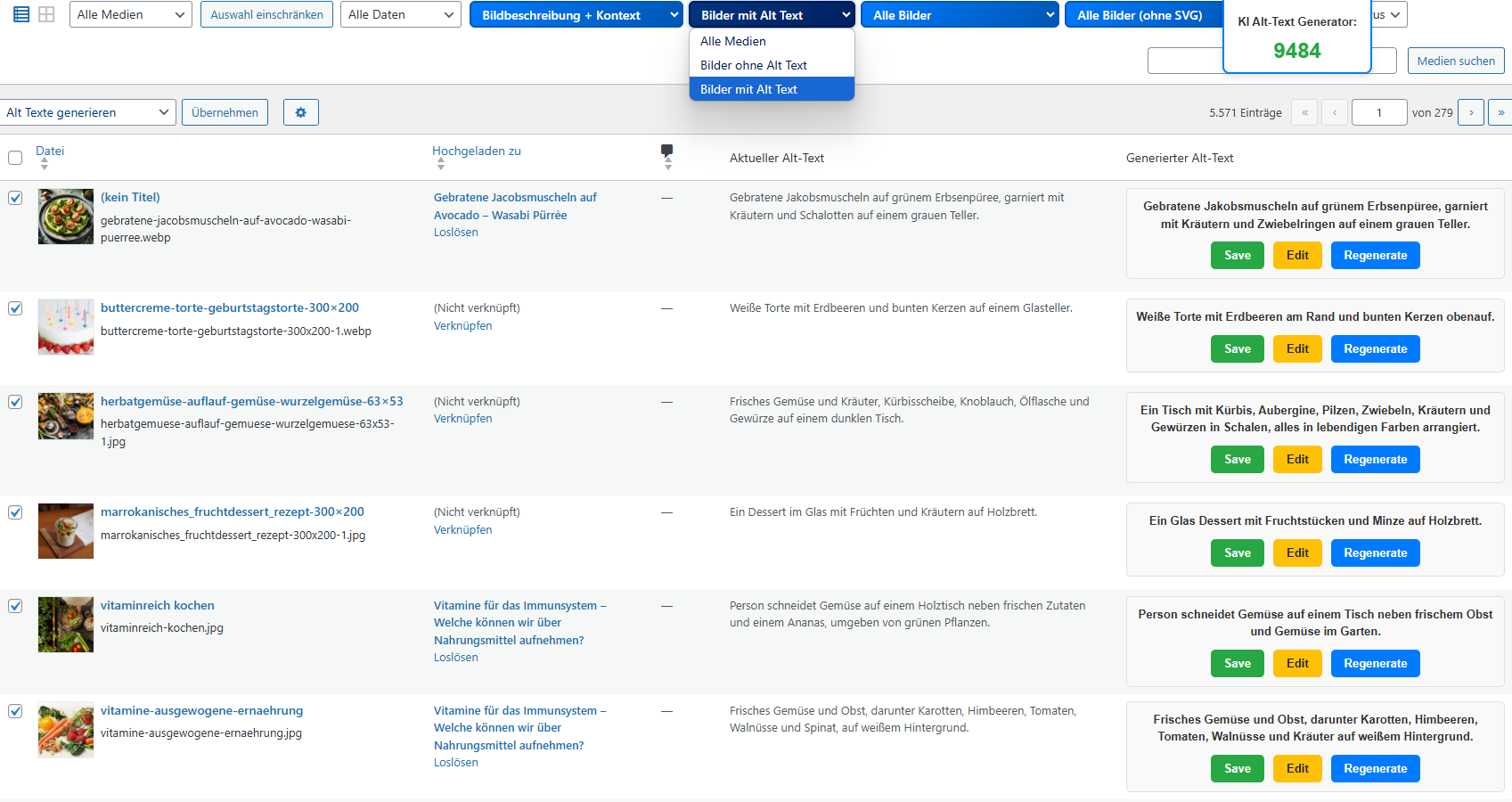
Eine Tabelle zeigt Bilddateien mit generierten Alt-Texten und Optionen zum Bearbeiten oder Speichern.

Quickly identify images without alt text

Filter all images without alt text in your WordPress media library – clearly, efficiently, and in just a few seconds. Ideal for accessible websites and SEO optimization.

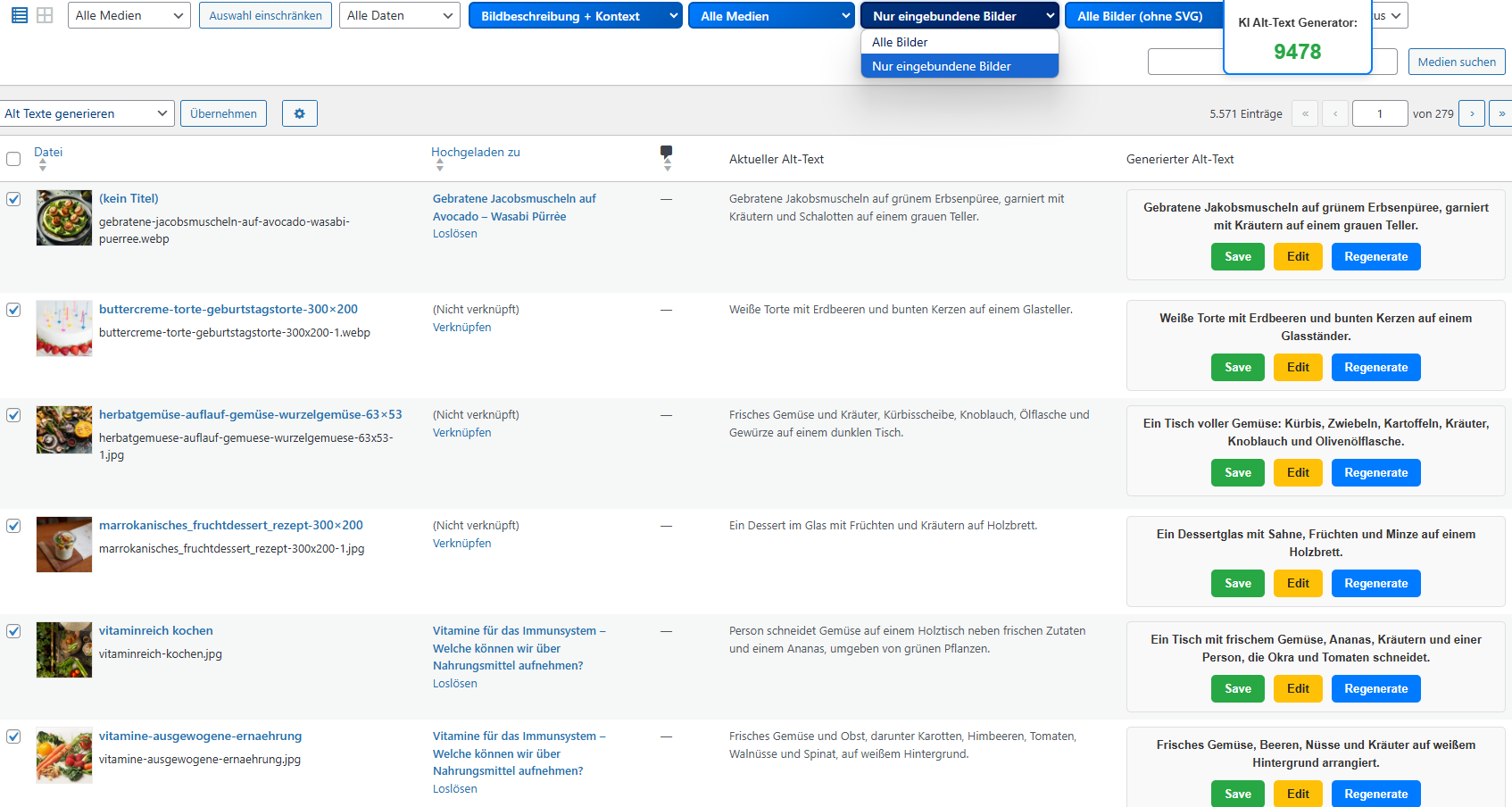
Benutzeroberfläche mit Bilddateien, generierten Alt-Texten und Bearbeitungsoptionen.

Show only embedded images

Focus on images that are actively used in posts or pages. This way, you specifically optimize the content that is truly relevant for your users and search engines.

Eine Liste von Bilddateien mit generierten Alt-Texten in einer Benutzeroberfläche.

Generate alt text with image context

Choose between a pure image description or an AI-generated alt text with contextual content. For particularly accurate and semantically valuable descriptions.

Eine Tabelle zeigt Bilddateien mit generierten ALT-Texten und Optionen zum Speichern, Bearbeiten oder Regenerieren.

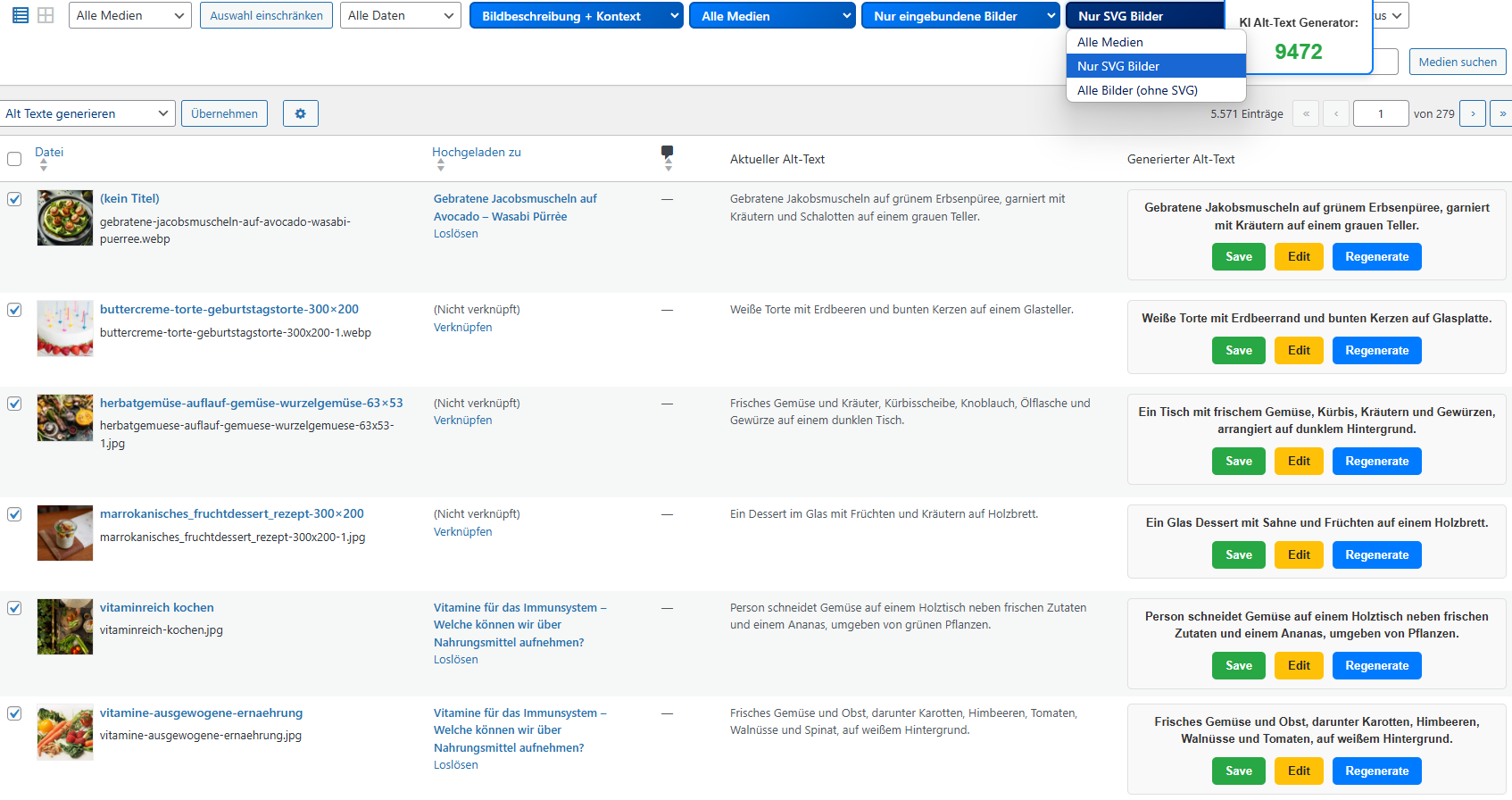
Filter pixel and vector files separately

Differentiate between classic image formats (e.g. JPG, PNG) and SVG files if necessary. This way, you keep track – even with complex media libraries.

 FLEXIBLE PRICES – 1 CREDIT FOR IMAGE DESCRIPTION, 2 FOR SMART CONTEXT ANALYSIS.  

Pay only for what you really need

Our pricing model makes it easier than ever to get started with AI-powered alt text creation – no matter how many images you want to optimize. One credit corresponds to a pure image description. For an image description including context analysis, 2 credits are required. You only pay for the services actually used – completely without subscription or hidden costs.

1 - 250 Credits

0.07 €

Price per credit

Ideal for smaller projects or occasional needs

251 - 2500 Credits

0.05 €

Price per credit

Perfect for medium volume and regular use

2500+ Credits

0.035 €

Price per credit

Best price – for agencies, shops, and companies with high demand
 Automation, SEO boost & legal certainty in one tool 

More than just alt texts – Your advantage at a glance

Alt texts are essential for accessibility and SEO, but their manual creation is time-consuming and error-prone. Our tool automates the entire process – quickly, efficiently, and legally compliant.

Save time and resources

Manually creating alt texts for each image is time-consuming. Our tool handles this task automatically and in seconds, whether for individual images or entire media libraries.

Legal certainty through accessibility

The Accessibility Strengthening Act (BFSG) stipulates that websites of a certain size or revenue must provide alt texts for relevant images. Our tool helps you to meet these requirements and remain legally compliant.

Better SEO performance

Search engines use alt texts for indexing images. With our tool, you get optimized, keyword-rich alt texts that improve your visibility in Google Image Search.

Flexible & versatile

Whether you use our WordPress plugin, analyze images via URL, or want to upload an entire CSV file – our tool adapts to your workflow

Generate your first 3 alt texts for free

Test the AI alt text generator as a WordPress plugin, batch processing, or single input now for free

Ein Mann in weißem Hemd lehnt an einer Wand, neben ihm das Rheinwunder Logo
Contact person:
Ralph Grundmann
0228 243 313 53
Create account now
 Everything you need to know about the AI alt text generator 

Frequently Asked Questions (FAQ)

Here you will find answers to the most important questions about our tool. Learn how the automatic alt text generation works, what advantages it offers, and how the tool is compatible with WordPress, WooCommerce, and other SEO plugins. If you have any further questions, we are happy to assist you.

In which languages can the AI alt text generator create image descriptions?

Our AI alt text generator supports the automatic creation of image descriptions in German (DE), English (EN), French (FR), Italian (IT), and Spanish (ES). The desired language can be individually set, so that the alt texts are generated directly in the appropriate language for your website or online shop.

In what variations can I use the AI alt text generator?

Our tool is available to you in three flexible variants: as WordPress plugin, for batch processing via CSV/Excel, and for single entry via image URL and page URL. After creating an account, you can immediately generate alt texts – regardless of whether you want to optimize individual images or efficiently process a large collection of images.

Do I need a separate API key or account to use the tool?

No, you do not need to obtain your own API key from OpenAI or other providers. The tool works immediately after installation and activation. We have already integrated the LLM connection, so you do not have to worry about the technical configuration. Unlike some plugins that require an OpenAI key, our alt text generator is plug & play.

How does the alt text generation work during image upload in WordPress?

Very simple: Once the plugin is installed, a process runs in the background that “catches” every image upload. As soon as you upload a new image to the media library, the tool sends an anonymous copy of the image to the AI. The AI analyzes the image and creates a description text within seconds. This alt text is then automatically inserted into the alt attribute of the image while the image is uploading. You will see the generated text immediately in the “Alternative text” field of the media library. The upload process is hardly noticeably delayed – the AI generation occurs asynchronously while WordPress saves the image. For you, this means: No extra step, the alt text is simply there when the image is uploaded. Of course, you can also modify the automatically generated alt text before saving the image.

How should the CSV file be structured for the batch upload to work?

When you use the tool “Screaming Frog“, you can easily export all “Images without Alt Text Inlinks” with the appropriate filter and upload the file directly to the generator. If you want to create a file manually, the columns should be named as follows:

  • Source (URL where the image is embedded)
  • Destination (Image URL)
  • Alt Text (Leave the field empty)

Here you will find a sample file for download

Can I also create alt texts in bulk for already existing images in my media library?

Yes, this is one of the core features. You do not need to edit each old image individually. The plugin offers bulk generation for existing media. In the WordPress admin, you will find an option in the media library (list view) to generate missing alt texts en masse. For example, you can select all images without alt text and let the AI describe them in one go. Depending on the number of images, the process may take several seconds or minutes, but it runs in the background, allowing you to continue working in another tab. Once completed, all previously empty alt text fields will have a suitable description. Of course, you will still have the option to edit the generated alt text. Overall, the bulk function saves a tremendous amount of time.

Does the tool overwrite my existing alt texts?

Existing manually set alt texts will not be overwritten automatically. The tool focuses on filling in missing alt texts. So if an image already has an alternative text, you can leave it unchanged. (If you still want to update certain alt texts, you can consciously regenerate them or adjust the text manually.) This approach ensures that your painstakingly created image descriptions are preserved and that changes are only made where there are actual gaps. This way, you have full control and need not worry that your content will be altered undesirably.

What is the status of data protection and GDPR compliance? Are images sent to external servers?

The images must be sent to the AI so that it can recognize the content – but: The transmission is encrypted and the data is only processed for the purpose of generating alt text. We do not store the images or the texts generated from them permanently. Once the alt text has been delivered back to your WordPress site, the uploaded image is deleted.

Is the plugin compatible with other SEO plugins like Yoast SEO or RankMath?

Yes, absolutely. The AI alt text generator works independently of other SEO plugins and is fully compatible. You can use it alongside Yoast, RankMath, All in One SEO, etc., without fearing conflicts. In fact, our tool perfectly complements these plugins: SEO suites take care of meta tags, sitemaps, on-page optimization – our tool fills the gap for image alt texts. If you are using RankMath, we recommend disabling their own ‘Fill Alt Attributes’ feature to avoid accidentally entering file names before our AI can provide a better text. However, there is fundamentally no double assignment: our plugin writes directly into the media field, which is recognized by all SEO and accessibility plugins. Thus, your entire SEO configuration remains intact, and you simply enhance it with smarter image optimization.

Is the AI alt text generator suitable for WooCommerce shops and product images?

Definitely. Online shops with numerous product photos benefit enormously from automatic alt texts. In WooCommerce, product images are stored in the media library like regular images – our tool treats them no differently. When uploading a product image, it immediately receives an alt text, just like blog images. The special thing for shops: It is often useful to mention the product name in the alt text to be found better on Google. Our tool can use contextual information when the content of the page suggests the product name.
This makes your product images described in an accessible way (for customers with screen readers) as well as SEO-relevant. They meet the legal requirements (product photos are considered content-essential images that need a meaningful alt text) and simultaneously increase the visibility of your products in Google Image Search.

Does this tool help to comply with the Accessibility Strengthening Act (BFSG)?

Yes, exactly that is one of the main reasons why we developed this tool. The BFSG requires websites that fall under the law to provide alternative texts for all non-decorative images, among other things. Our alt text generator ensures that no image slips by without a description. By automatically assigning meaningful alt texts, your content becomes immediately more accessible without you having to manually check everything. Of course, you should still keep an eye on the overall accessibility of your site, but when it comes to images, you are on the safe side with our tool.

How good is the quality of the automatically generated alt texts? Do I need to check or edit them?

The quality of the AI-generated alt texts is remarkably high. Thanks to state-of-the-art image recognition technology and language models, objects, people, scenes, and even moods in the image are accurately described. In our tests, over 95% of the alt texts matched what a skilled editor would have written. But of course, no AI is infallible: Occasionally, a detail may be misinterpreted or the alt text may be somewhat generic. For critical images (e.g., in an online shop with very similar product photos), we recommend briefly reviewing the generated alt texts. The great advantage is: Even if you want to edit, you already have a good starting text thanks to AI, instead of starting from scratch. In the media library, you can edit each alt text as usual. Overall, you will find that in most cases, no manual correction is necessary – the AI provides reliable, usable results that describe your content in an accessible and SEO-optimized manner.

Can I use the AI alt text generator for free?

Yes, you can generate up to three alt texts for free.

Price changes

Our prices may change, especially if the costs from our AI providers increase. In such cases, we reserve the right to adjust our prices accordingly. Of course, we will inform you in a timely manner about upcoming price changes.

How do I get support?

You can contact our support via email at support@rheinwunder.com. We are available from Monday to Friday between 9 AM and 4 PM and will respond as quickly as possible.